40 Updates: Everything You Asked For, All At Once
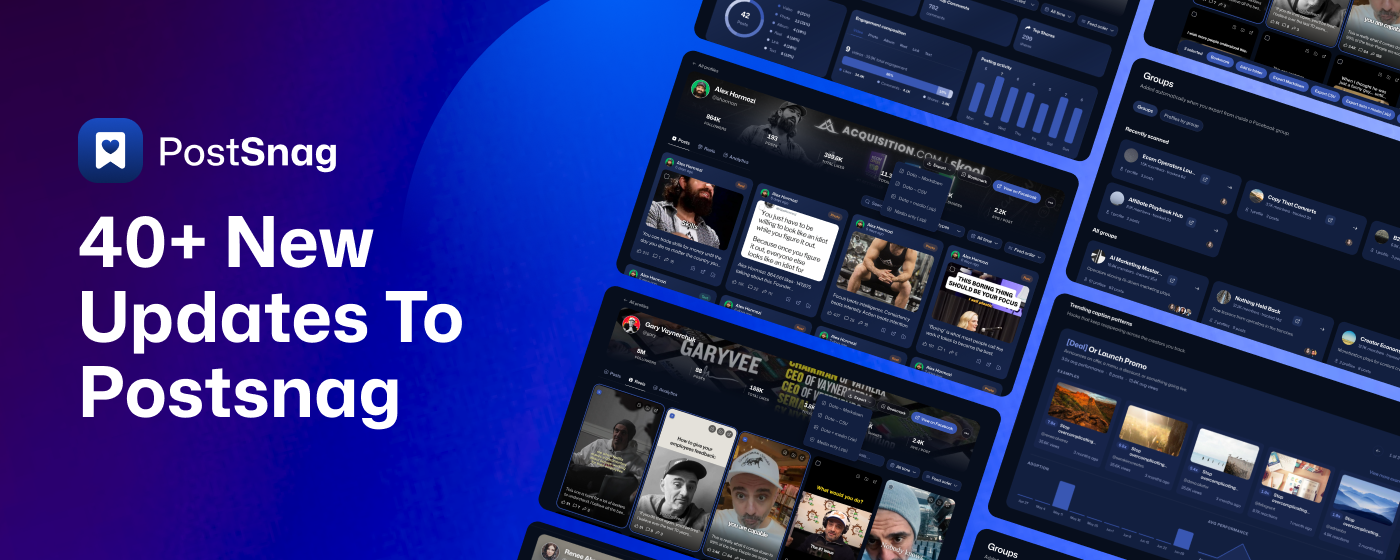
We launched PostSnag quietly in mid-July, then went heads-down. For weeks we watched how you actually used it and listened to what you kept asking for, and this is the result: the best and most-requested features, jam-packed into one drop and split into two tracks.
The Chrome Extension that grabs winning posts while you scroll.
The new Dashboard where everything you capture gets sorted, analyzed, compared, and exported.
Here are all the newest updates starting off with the Chrome Extension!
The Chrome Extension
The part that lives on Facebook with you and grabs the winning posts in one click. Before we go further make sure you update to the latest Chrome Extension. Simply close out and reopen your browser and it’ll automatically do it for you!
New: Capture an entire Facebook Group in one scroll
This is the big one, and the single most-requested thing you asked for. Until now, PostSnag captured one profile at a time. Now you can open a Facebook Group's feed, scroll it the way you normally would, and PostSnag captures the posts as you go, from across the group, not just a single member. Everything you pull lands in your dashboard next to your profile captures, ready to sort, analyze, and export. It is the fastest way yet to see what is working inside any group you are in, and we are sharpening the accuracy every week: the right group name and cover image, fewer duplicate or reshared posts showing up as someone's own, and cleaner links back to the original.
New: Download the actual videos, not just the thumbnails
PostSnag now captures the real, playable video behind the reels and clips it grabs, plus a clean cover image for each one. And when it comes time to pull your capture out, you choose exactly what you take: just the data as clean .md or .csv files, just the media (the videos and images themselves), or both together, all zipped into a single folder. Because the real videos come with it, you can hand the whole thing to ChatGPT or Claude and it can actually watch and read the content, not just work from a preview picture.
Improved: One click straight into capture
Click the PostSnag icon on any Facebook page and the capture sidebar opens right there, on the page you are already looking at. No extra popup, no extra step. It reads the posts on the page as you scroll, so you capture what is working without ever leaving Facebook. See a post worth keeping, grab it.
New: Refresh your capture on demand
A refresh button now sits right in the sidebar header. If your captured data ever looks stuck or out of date, one click reloads it on the spot, with no reinstalling and no losing your place. It is the quickest way to be sure what you are looking at is current before you export or analyze it.
Your Dashboard
Where everything you capture gets sorted, analyzed, compared, and exported. We rebuilt it from the ground up, so here is what is new, grouped by where you will find it.
Overview
Your home screen, and the bird's-eye view of everything you have captured. The moment you log in, the Overview rolls up every creator, post, and group you track into one snapshot, so you see the state of your whole world at a glance instead of a wall of raw data.
Nine headline numbers up top. Your top creator by engagement, your best day to post, your most used format, average engagement per post, best time to post, your reels share, your share rate, your posting cadence per week, and your longest caption, each with the supporting figure right under it.
Two leaderboards side by side. Engagement leaders ranks your creators by total engagement with their per-post average, and Biggest audience ranks them by follower count, each with a See all to go deeper.
The whole library, broken down. Content mix across reels, photos, albums, links, and text, engagement composition by post type with the likes, comments, and shares split, and posting activity by day of the week, all rolled up across everything you have captured.
Reel-level detail, library wide. Common reel durations, a long-versus-short split, and best time to post with a plain-language takeaway that calls out not just when you post most, but when your posts actually land hardest.
Your best posts and biggest groups. A ranked Top posts across your library list, each with its creator, format, and engagement, and a Biggest groups list ranked by how many profiles you have pulled from each, both with a See all.
Profiles
Every creator you capture is tracked here, with a full profile page and deep analytics on each one, so you can study any account as closely as you want.
Your whole roster, sorted your way. Every creator you are tracking in one place, split into the ones you captured directly and the hundreds pulled in automatically from your groups. Sort by most engagement, most likes, biggest audience, most posts, most groups, or most recently captured, and flip to a leaderboard of your top creators or just the outliers.
A real profile page for every creator. Open anyone to see their headline stats at a glance, total posts, likes, comments, shares, average engagement per post, and follower count, then browse their Posts, Reels, or Analytics, filter by post type or time range, and sort by most reactions, comments, or shares.
Deep analytics on any account. Each profile has its own breakdown: its most viral post, its top posts by reactions, comments, and shares, its content mix, posting activity by day, reel durations and a long-versus-short split, share rate, posting cadence, go-to format, and its best time to post with a plain-language takeaway.
Open any post for the full story. Click a post to see its caption, its format, whether it came from a profile or a group, when it went out, and whether it is already in your library, with a one-tap jump to the original on Facebook.
Bookmark, organize, and export. Bookmark the creators and posts worth keeping, drop them into folders, and multi-select posts or reels to export as Markdown, CSV, data plus media, or media only, straight from a profile.
Real names and faces everywhere. Reel tiles show the creator's name and avatar, and the old "profile.php" placeholders are gone, so every account reads the way it should.
Posts
This is your command center. Every post you have ever captured, from every creator and every Facebook Group, lives here in one place, so you can work across your whole library at once instead of one profile at a time.
See what is working across everyone, not just one account. Sort the whole library by most likes, comments, shares, or biggest outlier, and instantly see the winning posts across a niche or an entire industry. Spot the hooks, formats, and trends that overlap between accounts.
Zero in with filters. Show all posts, just your top posts, or just the outliers, a post that blew past that creator's own typical numbers, flagged with how many times over (like "116x their typical post"). Search by keyword, or narrow to any creators you pick.
A Reels view and an Analytics view built right in. Flip to Reels for the same browsing and outlier detection on reels, or open Analytics for the big picture across your whole library: content mix, engagement breakdown, posting activity by day, reel durations, long versus short, and your best time to post.
Multi-select and export in bulk. Tick any posts you want, across any accounts, and export them together as Markdown, CSV, data plus media in one zip, or media only. Build a swipe file of the best posts in a niche in a couple of clicks.
Groups
Every Facebook Group you capture becomes its own tracked space, added automatically the moment you export from inside a group, so a whole group is as easy to study as a single creator, with its own posts, profiles, and analytics.
Your entire group library, two ways to see it. Every group you have pulled from in one place, split into recently scanned and your full list. Each card shows the group's cover and name, its member count, how long you have been tracking it, how many profiles and posts you have captured from it, and the faces inside, with one click to open it or jump straight to it on Facebook. Flip to "Profiles by group" to see every creator organized under the group they came from.
A real page for every group. Open any group to its own dashboard: captured posts, tracked profiles, total engagement, and group size across the top, then Posts, Profiles, and Analytics tabs, plus buttons to view it on Facebook, export it, or delete it.
Browse a group's posts like your own feed. Search posts or creators, filter by type (photo, reel, album, link, or text), and sort by group feed order, most engagement, most recent, most likes, most comments, or most shares. Every post shows its creator, its type, its age, and its engagement, with a grid or list view and per-post bookmark, export, and save.
Every creator in the group, in one tab. The Profiles tab lists every account captured from that group, searchable, each with its own post count, so you can open anyone and study them the same way you study your own roster.
Analytics scoped to the whole group. A top-creators leaderboard ranked by engagement with a crown on number one, plus content mix, engagement broken down by post type, posting activity by day, reel durations, a long-versus-short split, and best time to post with a plain-language takeaway.
Export a whole group your way. Pull an entire group's captures as Markdown, CSV, data plus media in one zip, or media only, scoped to just that group. Deleting a group clears it and its posts without wiping the creators you still want to follow.
Compare
Also brand new, and there was nothing like it before. Line up to three profiles side by side and stack their whole analytics against each other, so you can see exactly who is winning, on what kind of post, and why.
Pick up to three creators at once. Drop any profiles you have captured into the three slots, swap any of them out whenever you want, and compare two head to head or all three together.
At a glance, winner by row. A quick comparison table lines up posts captured, followers, groups, last captured, bookmarked, and verified, and highlights whoever leads on each row, so the stronger account on every metric jumps right out.
The full breakdown for each, running in parallel. Every profile gets its own column next to the others: content mix across reels, photos, albums, and text, engagement composition by post type with the likes, comments, and shares split, posting activity by day of the week, common reel durations, a long-versus-short reel split, and best time to post with a plain-language takeaway.
Spot the difference in seconds. Because the same charts sit right beside each other, you can instantly see who leans on long reels versus short, who posts heaviest on which day, whose mornings beat their evenings, and who pulls comments and shares, not just likes.
Exporting
This is where your captures leave PostSnag and go to work, and it is far more than a plain download. You choose what to export, how much of it, and in what format, from a single post all the way up to your entire library.
Two ways to pull it:
Export everything at once. Hit the Export dropdown on any profile, any group, or the global Posts view and PostSnag pulls the whole thing in the format you pick.
Or hand-pick exactly what you want. Multi-select any posts or reels, on a profile, inside a group, or across your whole library, and a selection bar slides up at the bottom with Bookmark, Add to folder, and every export format, so you take just the ones you tapped. Because not everyone wants the whole profile, you can filter to the last seven days, sort by most liked or most commented, or narrow by post type first, then grab only those.
What you can export:
Any kind of profile, in full. Pull everything you captured from a creator profile, a business profile, or a Facebook page: every post, and every kind of post, reels, photos, videos, albums, and text, with the real media attached, not just links. Group members even get their own profile inside each group, so you can export one person's posts from within a specific group the same way.
A whole Facebook group. Scroll a group's feed the way you normally would, then export everything you just scrolled in one move: every author, every post, and the media behind them, bundled together as a single group.
Your entire library at once. The part most tools cannot touch. Open Posts in the sidebar and you are looking at everything you have ever scanned, say 50 creators and 30 groups all in one place, and you can bulk export the whole thing, all those creators, all those posts, all that media, in a single pass instead of pulling one profile at a time.
The format is yours every time:
Data as Markdown (.md): clean and readable, built to drop straight into ChatGPT, Claude, or any other AI.
Data as CSV (.csv): the same data as a spreadsheet, ready to sort, filter, and analyze, and just as AI-friendly.
Media only (.zip): the actual videos, reels, images, and album photos, downloaded as real files.
Data and media together (.zip): everything in one folder, so whatever AI you hand it to can read the captions and watch the videos.
And for the big pulls, large exports run in the background so your tab never freezes, with an in-app and email ping the moment your download is ready. Or grab a quick Markdown or CSV in one click straight from a profile.
Discovery
Brand new, and unlike anything else in the app. Discovery watches the creators you track and surfaces the caption formats and hooks that keep working across them, so instead of guessing what to write, you can see the patterns actually pulling reactions in your niche.
Named hook patterns, ranked by lift. PostSnag groups your tracked creators' posts into recurring caption formats and names each one in plain language, like "[Number]-Led Result" (leads with a figure: revenue, timing, or a count) or "Reaction In [A Few Words]" (a short caption carrying the post on its media alone). Each pattern shows its average performance as a multiplier and how many posts fit it, and you can page through them one at a time.
Real proof behind every pattern. Open a pattern to see the actual posts using it, each tagged with how far it beat or trailed the typical post (like 2.6x or 0.8x), its creator, its reaction count, and how recently it ran, with a View more examples to expand the full set.
See a hook catch on. Every pattern has an Adoption chart showing how fast the creators you track are picking it up week over week, and an Avg performance line showing whether it is still climbing or cooling off, so you can jump on a hook while it is rising.
Recent or Trending, your call. Flip between Recent, what is showing up across your creators right now, and Trending, the hooks that keep reappearing over time, and narrow the whole view to just the creators you care about with the filter chips up top.
Nothing swept under the rug. An Everything else section collects the posts that do not fit a recurring pattern yet, so you still see the outliers and one-offs, not just the tidy templates.
A few more things
The smaller upgrades that make PostSnag nicer to live in day to day.
A soft landing on day one. The moment you sign up you get a guided tour, a getting-started checklist, and a short welcome video, so you are capturing your first profile in minutes instead of staring at a blank screen.
Recent scans, always in reach. Every profile and every group you scan lands in a Recent scans list in the sidebar. Hover any one for two options: remove it from recents, which clears it from the list but keeps the profile and its data, or delete it, which removes that profile and everything captured with it for good.
Bookmark anything, browse it your way. Save an individual post, a whole profile, or an entire group, then flip your bookmarks between Posts, Profiles, and By group to find what you saved fast.
Breadcrumbs that keep you found. Navigation always shows exactly where you are, like All groups, then the group, then the profile, and takes you back where you meant to go instead of dropping you on a generic screen.
Help in the corner, everywhere. A support button now sits in the bottom right of every page. Click it to send the team a message or search the help center right where you are, without losing your place.
More from PostSnag
Not features exactly, but new ways to get more out of PostSnag.
New: Earn 30% for referring PostSnag, for life
Love PostSnag? Get paid to share it. Our affiliate program pays 30% recurring commission on everyone who subscribes through your link, for as long as they stay subscribed, so every Pro member you send keeps paying you month after month (about $5.70 each, every month they stay). There is a 30-day cookie so you still get credit if they think it over, no cap on what you can earn, and monthly payouts. It is free to join at
New: Free Creator Breakdowns from the biggest names on Facebook
We ran PostSnag on some of the biggest creators on Facebook and published the results, free. Each page breaks down the exact hooks Gary Vaynerchuk, Neil Patel, and Sabrina Ramonov open with, their best-performing posts and why they work, and reusable templates you can lift, and every one comes with a free AI-prompt file and a style file you can download and put to work right away. It is the product doing its thing on the pros, built from real captured data, not guesses.
New: Simple plans built for creators
Start free with no card required. Go Pro at $19 a month for unlimited everything: unlimited tracking, the full analytics dashboard, the Discovery feed of viral outliers, and AI-ready exports. Or grab Lifetime at $139 once and never pay again, with everything in Pro plus priority support and every future feature included. Both paid plans come with a 14-day money-back guarantee, so you can try the whole thing risk free.
New: A full help center and a public roadmap
Over 90 how-to articles are live at help.postsnag.com, covering everything from installing the extension to capturing groups, exporting, and getting the most out of your dashboard. And our public roadmap lets you see what is coming next and vote on it, so the feature you want most might be one click away from the top of the list.
This is just the start
Everything above landed in a matter of weeks, and it is the first time we have shared it all at once. Add PostSnag to Chrome, and if you are already in, open the new dashboard and try Compare and Best Time to Post on your top profiles. Then tell us what to build next on the roadmap. We are listening.